
How to Build a Cursor-Like AI Code Editor: Inside Sednar, From Prototype to Public App
A Cursor-like AI code editor is three things in one window: an editor, a chat panel, and an agent loop behind the chat. The loop sends your request and a list of tools to a language model. The model asks for a tool (read this file, search for that name, replace these lines), the server runs it and returns the result, and the loop repeats until the model says it is done. Every edit shows up as a diff you can keep or undo. That is how Cursor's agent behaves from the outside, and it is what you build to make one.
This guide shows each piece on a real one: Sednar (source on GitHub), our Cursor-like editor that runs in the browser with your own API key. It grew out of the Flask prototype in How I Built a Live-Browser AI Coding Agent; the general recipe is in How to Build a Cursor-Like AI Coding Agent. This post is about the production version: what a harness is, one real turn traced message by message, how Sednar is built today, and what it took to turn a one-laptop prototype into a public app.




- Model providers
- 7your own key
- Built-in tools
- 31plus plan, questions, web, MCP
- Language servers
- 26language entries
- Automated tests
- 130+scripted-model turns included

Opens with a sample project. Add an API key in Settings › Models.

Who this is forStudents and developers who want to know what actually happens between pressing Enter and seeing a diff. You don't need an AI background: every term is explained in plain words, and the glossary links to a longer guide for each one.
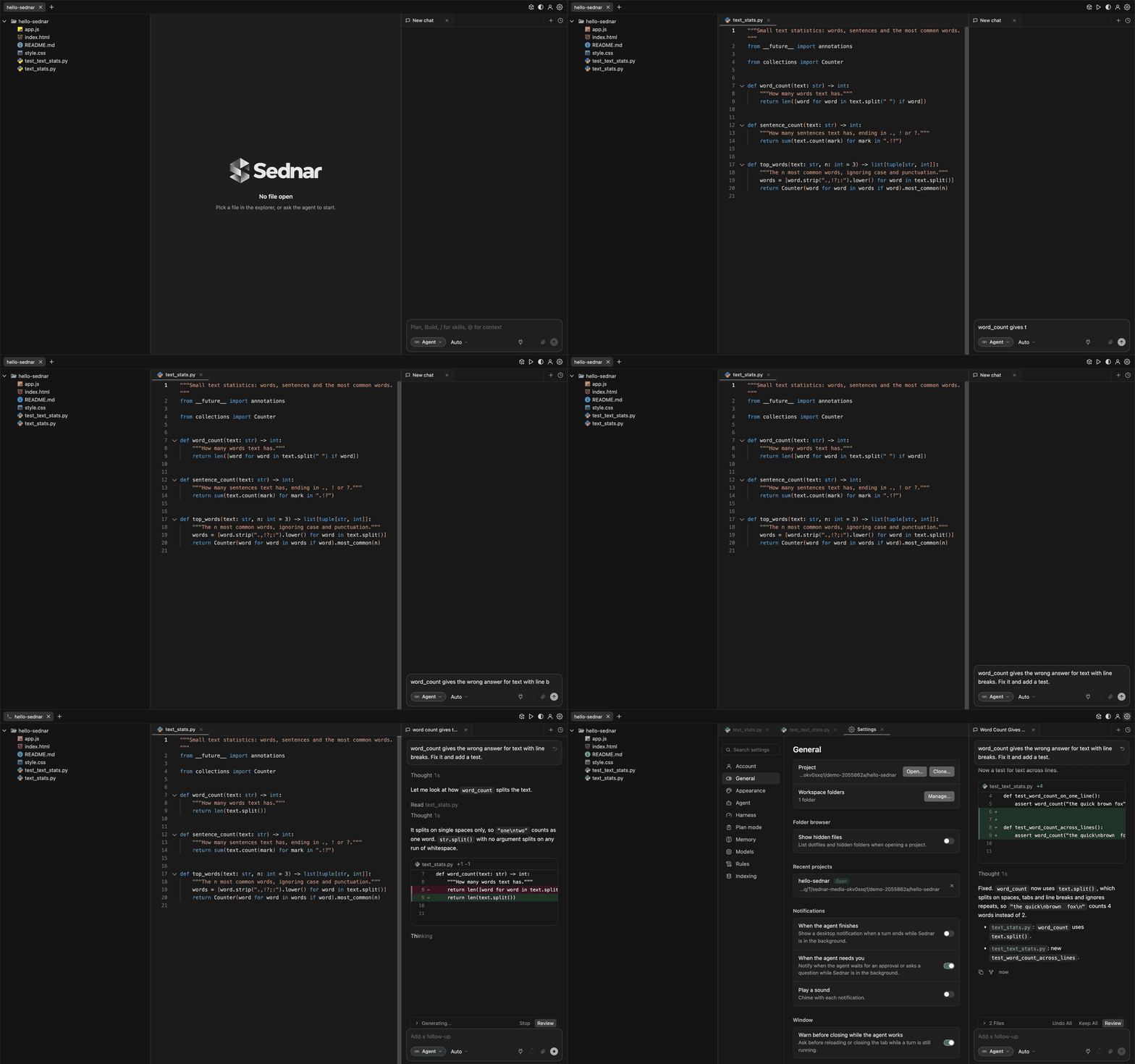
All screenshots are from the real app running the sample project. The model's replies are scripted so each run is identical, but every search, read and edit the agent makes runs for real.
What is a harness?
The analogy. Picture a brilliant consultant you can only reach by phone. They can't see your screen or touch your keyboard. You read them the code; they say "replace this line with that one"; you make the change and tell them what happened. The consultant is the model. You, doing the reading, the typing, the note-taking, and hanging up when the job is done or the call goes in circles, are the harness.
The precise version. A harness is the program wrapped around a language model that turns its text replies into actions. On every step it:
- builds the prompt: instructions, the project's rules, the conversation so far;
- offers tools: a list of functions the model may call, each described as a JSON schema (name, purpose, arguments);
- runs the tool calls the model asks for, and adds each result to the conversation;
- decides whether to go round again or stop.
That is all a model ever "does": it writes text, and some of that text is a structured request to call a tool. In Sednar the harness is run_sednar_turn() in harness.py, at 3,422 lines the biggest Python file in the repository. Nearly all of it exists to make those four steps safe, cheap and reliable. Our guide to running a coding agent locally explains the same split from the user's side.
| The model (Claude, GPT, Gemini…) | The harness (Sednar) |
|---|---|
| Reads text, writes text | Reads and writes your files |
| Chooses the next tool and its arguments | Checks the call is allowed, runs it, returns the result |
| Writes the new code as text | Finds the exact spot, applies the edit, keeps an undo copy |
| Says when it thinks it is done | Checks to-dos, failing tests and open questions first |
| Sees only what is in its context window | Decides what goes in the window and trims old results |
The key ideaThe model never touches your disk. Every read and every write is a function the harness runs on its behalf. That is why safety lives in the harness: it can refuse a path, a command or a mode, whatever the model asks for.
One real turn, step by step
Here is the turn from the screenshot at the top, slowed down. You ask: "word_count gives the wrong answer for text with line breaks. Fix it and add a test." The sample project's text_stats.py starts like this:
def word_count(text: str) -> int:
    """How many words text has."""
    return len([word for word in text.split(" ") if word])
The bug: split(" ") splits on spaces only, so "the quick\nbrown" comes back as two words instead of three.
Step 1: the page sends your message
Pressing Enter sends one HTTP request, POST /sednar-agent, with a small JSON body (trimmed here):
{
  "project_path": "~/hello-sednar",
  "question": "word_count gives the wrong answer for text with line breaks. Fix it and add a test.",
  "mode": "agent",
  "model": "auto",
  "session_id": "sednar_…",
  "socket_id": "…"
}
On sednar.com, ~ means your own folder. Before anything else, the public-mode gate checks that you are logged in, that every path in the body stays inside your folder, and that you don't already have two chats working. Then the turn starts in its own thread. The request stays open until the turn ends; everything you see meanwhile arrives over a separate live connection (the socket_id).
Step 2: the harness builds the prompt
The model can't see your editor, so the harness assembles everything it needs as a list of messages:
| Message | What it holds |
|---|---|
system | Who Sednar is and how to work, with sections only for the tools offered this turn, plus the mode and, on sednar.com, a note that there is no shell |
| Project layout | A short tree of the project's files |
| Project rules | AGENTS.md, CLAUDE.md, .claude/rules/*.md (the sample project has none) |
| Earlier messages | The chat so far, or a summary once it gets long |
| Turn context | Matching notes from project memory, if any |
user | Your request |
The system prompt opens with: "You are Sednar, an autonomous coding agent working in the user's local project workspace." Alongside the messages goes the tool list: about twenty function schemas on sednar.com. This is the real schema for the edit tool, trimmed:
{
  "name": "edit_file",
  "description": "Replace an exact string in a file. … old_string must match exactly one place unless replace_all=true …",
  "parameters": {
    "type": "object",
    "properties": {
      "file_path":   {"type": "string"},
      "old_string":  {"type": "string", "description": "Exact text to find"},
      "new_string":  {"type": "string", "description": "Replacement text (must differ from old_string)"},
      "replace_all": {"type": "boolean", "description": "Replace all occurrences of old_string (default false)"}
    },
    "required": ["file_path", "old_string", "new_string"]
  }
}
The harness also classifies the request once: here, a small code change in one file. With the model set to Auto, that means the fast model of your default provider (see Auto model routing).
Step 3: the model replies with a tool call
The model's first reply is not an answer. It is a short note plus a request to run a tool. This is the call from the scripted demo turn (docs/media/capture.py in the repository; the id is random):
{
  "content": "Let me look at how `word_count` splits the text.",
  "tool_calls": [{
    "id": "call_8f2a91c04b3e",
    "type": "function",
    "function": {
      "name": "read_repo_file",
      "arguments": "{\"file_path\": \"text_stats.py\"}"
    }
  }]
}
content is what you see in the chat. arguments is a JSON string the model wrote, which the harness parses and checks before running anything. Anthropic, Google and OpenAI each have their own wire format for tool calls; Sednar's three provider clients translate them all into this one shape, so the loop never cares which model is on the other end. The tool system chapter of our generic guide covers schema design in more depth.
Step 4: the harness runs the tool
- Is
read_repo_fileallowed in Agent mode? Yes. - Does
text_stats.pyresolve to a path inside the project (and inside your folder)? Yes. - Read it, number the lines, cut anything too long.
- Add the result to the conversation as a
toolmessage with the sameid, and tell the page, which shows "Read text_stats.py".
{
  "success": true,
  "file_path": "text_stats.py",
  "content": "1| \"\"\"Small text statistics: words, sentences and the most common words.\"\"\"\n2| from __future__ import annotations\n…\n9|     return len([word for word in text.split(\" \") if word])\n…",
  "total_lines": 20,
  "showing": "1-20"
}
The 9| prefixes help the model refer to lines. They are not part of the file, and the tool description says so, because models sometimes copy them into edits (Sednar strips them if they do).
Step 5: the model asks for an edit
With the code in view, the model explains the bug and calls edit_file (arguments shown decoded):
{
  "file_path": "text_stats.py",
  "old_string": "return len([word for word in text.split(\" \") if word])",
  "new_string": "return len(text.split())"
}
Note what the model did not send: a line number, or the whole file. It sent the exact text to replace and the text to put there.
Step 6: how the edit is applied
- Check the path again, and refuse anything inside
.git. - Count the matches of
old_stringin the file. None: fail, and show the model the closest block so it can copy the real text. More than one: fail unless it asked forreplace_all. Exactly one: carry on. - Save a baseline: the first time a file is edited in a chat, its original content is stored, along with a checkpoint copy for this message.
- Replace and write atomically: to a temporary file first, then renamed over the original, so a crash never leaves half a file.
- Diff the before and after: +1 −1. The page shows a diff card, and the changes bar says "1 File".
- Report back to the model with a short result:
{
  "success": true,
  "file_path": "text_stats.py",
  "additions": 1,
  "deletions": 1,
  "summary": "File text_stats.py updated successfully."
}
Why exact matching mattersLine numbers move after every edit, and models miscount them. A unique piece of text is an address that cannot point at the wrong place: if it matches nowhere or twice, the edit fails loudly and the model tries again with more context. A failed edit costs one more step; an edit in the wrong function costs you an afternoon. (If the only difference is whitespace and exactly one block matches, Sednar applies it and re-indents to fit.)
Step 7: the result goes back, and the loop goes round
The edit result joins the conversation, the whole conversation goes back to the model, and it asks for the next tool: another edit_file, this time on test_text_stats.py, adding test_word_count_across_lines. The same six checks run. The changes bar now says "2 Files".
Step 8: when the loop stops
The model's fourth reply has no tool call, just the summary you see in the chat. Before the turn may end, the closing gate checks: are there open to-do items? Did the answer end with an unasked "shall I go ahead?"? Did tests run and fail? Did code change with nothing tested, in a project with a test command Sednar recognises? None apply here, so the summary streams to the chat, the request returns, and the turn is saved twice: as chat_history.jsonl for the model and as the rendered transcript for you.
| Model call | The model said | Sednar did |
|---|---|---|
| 1 | read_repo_file text_stats.py | Read 20 numbered lines, showed "Read text_stats.py" |
| 2 | edit_file text_stats.py | Saved a baseline, replaced one line, showed a +1 −1 diff |
| 3 | edit_file test_text_stats.py | Saved a baseline, added the test, showed a +4 diff |
| 4 | A plain-text summary | Passed the closing gate, ended the turn, saved the chat |
Undo is one click away. Undo All writes both baselines back, Keep All drops them, and the restore button on your message puts every file back as it was before the request and rewinds the chat to it.
What a Cursor-like editor needs
That turn used every part of the system once. Here they are, with what Sednar uses for each.
| Piece | Job | In Sednar |
|---|---|---|
| Editor | Edit files, with language smarts | Monaco 0.45, TS/JS intelligence in a web worker |
| Agent loop | Model, tools, results, repeat | run_sednar_turn(), a Python generator |
| Tools | Read, search, edit, run | 31 built in, plus plan, questions, web and MCP |
| Live progress | Show steps as they happen | Numbered Socket.IO events |
| Review and undo | Keep, undo, go back | Baselines per chat, checkpoints per message |
| Models | Call providers with tools | 7 providers, Auto routing per step |
| Context control | Fit long sessions in the window | In-turn trimming, session summaries, project memory |
| Project context | Follow the repo's rules | AGENTS.md, CLAUDE.md, .claude/rules, MEMORY.md, MCP, LSP |
| Isolation (if public) | Keep users apart | Per-user folders, path gate, bubblewrap, encrypted keys |
One thing it does not have is AI Tab autocomplete: Sednar is a chat agent, not a ghost-text engine. If that is what you want, see Best Autocomplete Models for Coding and what to pair with Claude Code for Tab.
Sednar's architecture
Sednar is one Python server (Flask and Socket.IO under gunicorn, one process, many threads) and one page. Each message is a POST to /sednar-agent. The turn runs in a thread and streams progress over Socket.IO as it happens (thinking, answer text, tool calls, results, diffs, token usage), each event numbered so the page can put them in order. When the turn ends, the POST returns JSON and the turn is saved to the chat. The prototype split this between server-sent events and a WebSocket; Sednar sends everything live over the one socket. If those terms are new, start with How SSE Streaming Works in Chatbots, then SSE vs WebSocket vs REST API for Live AI.
Browser · sednar.com
POST /sednar-agent (JSON at the end) · Socket.IO events while it runs
Server · Flask + Socket.IO, one process
One thread per turn
Harness · run_sednar_turn()
- Classify
- Pick model
- One reminder
- Compact
- Call model
- Run tools
- Closing gate
Steps 2 to 7 repeat until the gate lets the turn end.
LLM router
Gemini, Anthropic and OpenAI-compatible clientsRetries; image descriptions for text-only modelsTools
Read, search, edit, plan, ask, memory, subagents, webShell, MCP and LSP: off on the hosted siteDisk
Projects, settings, plansPer project: chats, baselines, checkpoints, memory indexSandbox · bubblewrap
The terminal and every git the server runs for you see only your folder, with no network and none of the server's secrets.
What the loop does on every step
The walkthrough had four steps. Real turns run to dozens, so each step does more than call the model:
- Checks for Stop. The turn can end between steps or tool calls, and keeps what already happened.
- Picks the model (see Auto model routing).
- Adds at most one reminder, most pressing first: loop guard, step budget (at 80, 92 and 97%), failed edits, failing tests, too much reading without editing, scattered searches, finishing after the edits, the to-do list. Two reminders at once tend to pull different ways.
- Compacts the context if it is over budget.
- Calls the model, streaming reasoning, text and tool-call arguments to the page.
- Runs the tool calls: reads in parallel, writes in order, and subagents that own separate files side by side.
- Checks the closing gate when the model finishes. A text answer and
attempt_completionface the same checks: open to-dos, a closing "shall I go ahead?", failing tests, and, if code changed untested, the project's own check (pytest,npm test,cargo testand so on).
The defaults: 300 steps in Agent mode, 100 in Plan and Ask, and only "finish" allowed in the last two. The same call with the same arguments 5 times earns a nudge and a bigger model; 10 times stops the turn with a note on where things stand. All of these are settings.

The tools
Tools are plain function-calling schemas, like the edit_file one above. The system prompt is built from the tools offered in that turn, so it never describes one the model cannot call.
| Group | Tools | On sednar.com |
|---|---|---|
| Read and search | read_repo_file, list_repo_dir, grep_repo (ripgrep), glob_files, find_files, git_log | On |
| Code structure | find_symbol, find_references, list_symbols, ast_symbols | On |
| Edit | edit_file, multi_edit, write_file | On |
| Track and finish | todo_write, update_goal, attempt_completion | On |
| Memory | update_memory, memory_search, memory_get | On |
| Delegate | spawn_subagent (readers, or writers that own files) | On |
| Ask and plan | ask_question (every mode), create_plan (Plan mode) | On |
| Web | web_search, web_fetch (no private addresses) | On |
| Run | run_command, command_status, kill_command, restart_command | Off |
| Language servers | lsp_definition, lsp_hover, lsp_diagnostics and 4 more | Off |
| MCP | call_mcp_tool and tools named mcp__server__tool | Off |
Code search is ripgrep plus a symbol index, not embeddings; embeddings are used only for project memory (more on that below, and on retrieval in general in What Is RAG). Results are trimmed before they go back to the model: command output keeps its failure lines and its tail, where the error usually is.
Here is a longer turn on the sample project's bill splitter: "The tip in the bill splitter is far too high. Find out why and fix it." The agent searches, reads, then fixes two lines with one multi_edit call.

multi_edit with two replacements in app.js (+2 −2). The tip was multiplied by 15 instead of 0.15.Edits, diffs and undo
The walkthrough showed the edit path once. The full set of rules for edit_file:
- No match: the edit fails, and the error shows the closest block so the model can copy the real text.
- Several matches: the edit fails unless the model asked for
replace_all. A wrong-place edit is worse than a retry. - Whitespace drift: if exactly one block matches once trailing spaces or indentation are ignored, Sednar edits it and re-indents the new text to fit.
- No blind overwrites:
write_filewill not replace a file the agent has not read this turn. - Atomic writes: a temp file, then a rename.
- All or nothing:
multi_editapplies several replacements to one file in order, and either all succeed or the file is left untouched.
Edits land on disk at once, so the editor and terminal see them. Before the first edit to a file in a chat, Sednar keeps a baseline copy. Undo All writes the baselines back and deletes files the agent created, Keep All drops them, and Review opens the changed files. Each message you send also starts a checkpoint: restoring one puts every file touched since then back and rewinds the chat to that message. The red and green blocks are diffs, the same idea explained in the prototype's diff section.

Agent, Plan and Ask modes
The mode chip under the message box decides which tools the model sees, and a call that slips through anyway is refused with a note on what to do instead.
| Mode | Tools | What you get |
|---|---|---|
| Agent | Everything | Changes made, checked and summarized |
| Plan | Read-only tools, ask_question, create_plan | A Markdown plan and task checklist; Build runs it |
| Ask | Read-only tools, ask_question | Answers from the code, no edits |
In Plan mode you can edit the checklist before building; Build then runs in Agent mode with the plan attached and the checklist as its to-do list. Asked to "Plan a dark mode for the bill splitter", the agent reads index.html and style.css in one parallel step, then writes the plan:

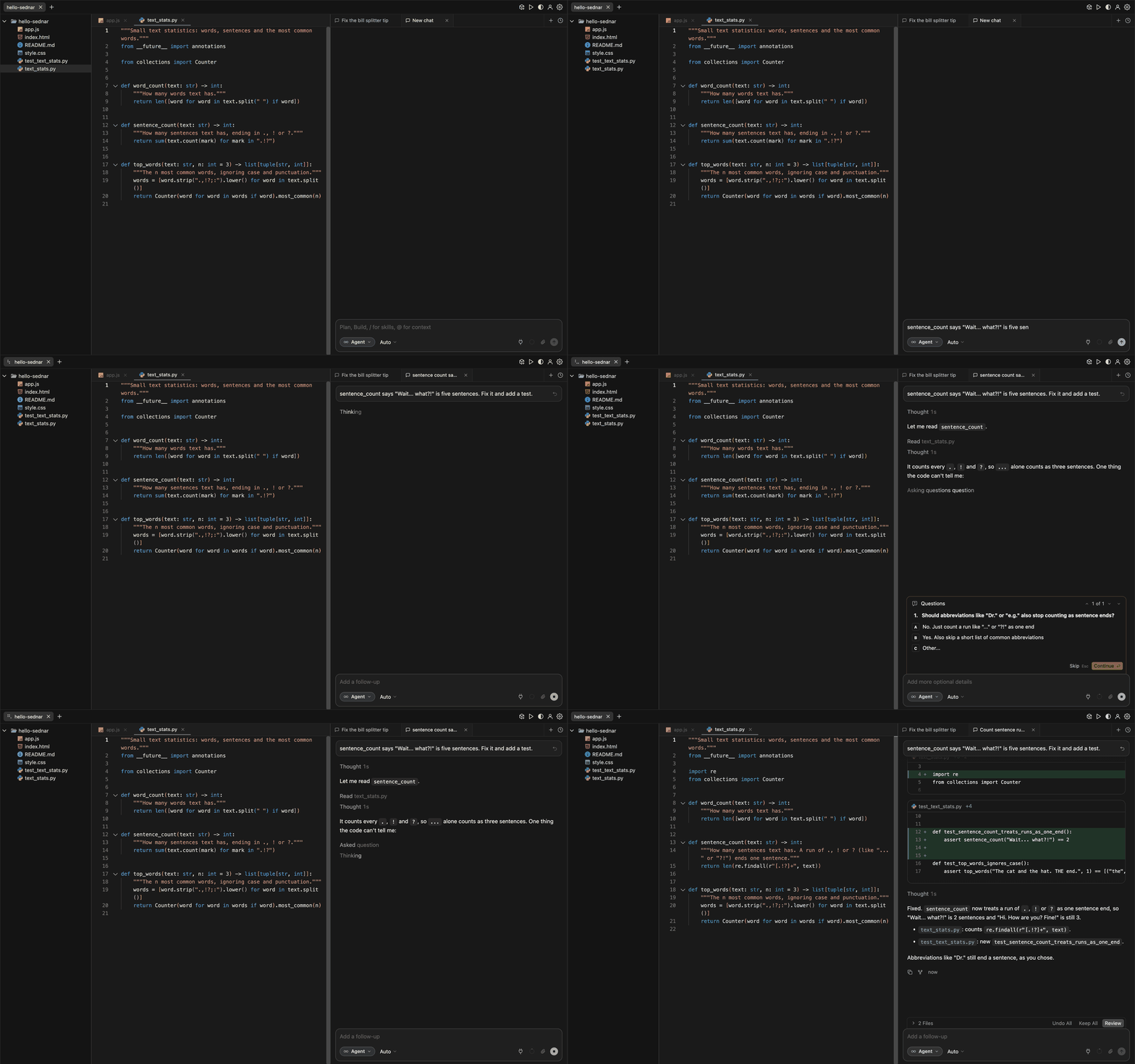
The questions card works in every mode: the model calls ask_question with options (one or several) or an open text box, the turn waits, and your answer continues the same turn. It also fixes a habit. Models like to end with "Shall I go ahead?", and Sednar holds that answer: a routine, low-risk step of the work you asked for gets "carry on", while anything risky (deletes, deploys, payments, production) must be asked in the card or left open in the summary.

Auto model routing
Add keys in Settings › Models and pick a default provider. On Auto, Sednar chooses per step, not per chat:
| Situation | Auto picks |
|---|---|
| An ordinary step | The default provider's fast model |
| Context over about 600,000 characters | The large model |
| A stuck loop or repeated failed edits | The large model, for the rest of the turn |
| A hard multi-file change, edit still to make | The large model |
| Images in the request | A vision model, from another provider if needed |
| A code change with no images | A code-tuned model, if the provider has one |

The catalog is a YAML file: each provider discovers the newest models your key can use or lists a fixed set, and models can be flagged fast, vision: false or code. If you pick a text-only model yourself and attach a screenshot, a vision model describes it in text first, and the description is cached. A "best model" option ranks across every provider you have a key for. Within one provider, the whole pick is this function, from llm/settings.py in the Sednar repository:
def _role_model(provider: str, role: str, *, images: bool = False, code: bool = False) -> str | None:
    """Auto's pick within one provider. images: must read images. code: prefer a code model."""
    models = provider_models(provider)
    if images:
        models = [m for m in models if m["vision"]]
    if not models:
        return None
    fast = role == "fast"
    if code:
        coders = [m for m in models if m["code"]]
        pick = next((m for m in coders if m["fast"] == fast), None) or (coders[0] if coders else None)
        if pick:
            return pick["id"]
    general = [m for m in models if not m["code"]] or models
    wanted = [m for m in general if m["fast"] == fast]
    return (wanted or general)[0]["id"]
Which models to put behind it is a cost question as much as a quality one: see Cheapest LLM for Coding, AI Model API Pricing Compared and Best AI for Coding. For the thinking behind cheap rules before model calls, see Auto Model Routing Without Calling an LLM to Pick an LLM.
Keeping long sessions in context
Every step resends the whole conversation, so context is both the main cost and the main failure point. Where Claude Code's tokens go shows the same problem with real numbers. Sednar's answer:
- Plan for a working window: the model's own window, capped at 200,000 tokens even on million-token models.
- Count everything: the budget is 75% of that (adjustable) minus the tool definitions. Text counts at about four characters a token; images by pixel area, or 1,400 tokens when the size is unknown.
- Trim within the turn: superseded file reads and repeated searches go first, then old tool results, oldest first, keeping the last 10 whole. Big arguments in old edit calls are cut short.
- Summarize between turns: past about 85%, facts worth keeping go to project memory, then older messages become one summary, which the next summary folds in. The prototype's version is in its compaction section.
Rules, memory, MCP and LSP
Rules. AGENTS.md, CLAUDE.md and AGENT.md from the project folder up to the git root, plus .claude/rules/*.md, are added as a reminder (20,000 characters per file, 60,000 in all). A message starting with /name expands a command from .claude/commands/ or a skill from .claude/skills/name/SKILL.md. So the rule files, commands and skills you keep for Claude Code are picked up as they are. For what belongs where, see Skills vs Rules in Claude Code and Cursor; to move chats between tools, Migrate Cursor to Claude Code and Import Claude Code Conversations into Cursor.
Memory. Each project keeps a MEMORY.md and session logs, indexed in SQLite with full-text search and local hashed embeddings (no API calls), blended 40/60 and re-ranked for recency and variety. The top matches join the start of each turn: retrieval-augmented generation in miniature.
MCP. Servers come from ~/.sednar/mcp.json, ~/.claude.json, .mcp.json or .vscode/mcp.json, and up to 64 of their tools appear as mcp__server__tool. A policy sorts each into read or write: write tools are refused in Plan and Ask, and only read tools run in parallel. For what an MCP server can connect an agent to, see Automate Data Engineering Fixes with AI Agents and MCP or our MCP server development service.
LSP. Language servers for 26 language entries, from Python and TypeScript to Go, Rust and Terraform, drive editor completions, hover, rename and live errors, plus the agent's lsp_* tools. After an edit, new errors go straight back to the model before it may finish.
On the hosted siteMCP servers and language servers are programs running on the server, so sednar.com switches both off, along with the agent's shell. Which leads to the biggest part of the work.
From prototype to public app
The prototype ran on one laptop for one person. Sednar runs on a shared server for anyone who signs up.
- Steps per turn
- 20 › 300
- Built-in tools
- 14 › 31
- Model providers
- 1 › 7
- Context budget
- 128k fixed › per model
| Flask prototype (August 2026) | Sednar (November 2026) | |
|---|---|---|
| Users | One developer, local project | Anyone with an account at sednar.com |
| Models | Azure OpenAI | 7 providers, your own key, Auto per step |
| Steps per turn | 20 | 300 in Agent, 100 in Plan and Ask |
| Tools | 14 | 31 built in, plus plan, questions, web and MCP |
| Context budget | Fixed 128,000 tokens | Per model, capped at 200,000, trimmed at 75% |
| Live updates | SSE for answer text, WebSocket for tool events | Socket.IO for everything live, JSON at the end |
| Shell | Local subprocess with a blocklist | Off for the agent; terminal in a bubblewrap jail |
| Code size | About 4,700 lines of Python, 3,700 of JavaScript | About 28,900 lines of Python, 18,900 of JavaScript |
Where those 28,900 lines go, by file:
The ten lessons that cost the most time:
- Make public mode a layer, not a fork. At startup it swaps a short list of functions (path checks, the tool list, the dispatcher, the system prompt, where settings and keys live). The harness keeps one code path.
- Carry the user into every thread. The current user is a context variable copied into thread-pool work, so parallel tool calls use the right folder and keys. Long-lived shared workers never hold one.
- Switch off what runs programs: the agent's shell, background commands, MCP servers and language servers. The system prompt says so, and the agent tells you what to run on your own machine.
- Jail git as well as the terminal. A user can write
.git/configfrom the terminal, and git runs programs named there, so every git for a user's folder runs in the same bubblewrap jail, with settings a repository cannot override. - Gate every path. Each path in a request or socket event must stay inside the user's folder. Clones are https only, one commit deep, 200 MB at most.
- Encrypt keys with something the server does not keep. For email accounts, keys are AES-GCM encrypted under a password-derived key. Unlocked keys live in memory, so the site runs one process and a restart logs everyone out.
- Cap everything per user: by default two working chats, two terminals, 500 MB of files, rate-limited logins.
- One gate for every finish. Early on, some ways of ending a turn skipped the checks.
- Keep two records per chat: JSONL for the model, the rendered transcript for people, so a reopened chat looks exactly as you left it.
- Test with a scripted model. Agent-turn tests run the real harness against replies written in the test, with no API key and the same result every run; the screenshots in this post are made the same way. Our guides to agent testing and evaluation and regression tests from production failures go further.
Two more choices shaped the product: the built-in browser, design compare and Figma import were cut so Sednar does one job, and the page patches its DOM in place so a streaming chat never steals your scroll position, focus or half-typed text.

Build your own: the minimum pieces
You do not need all of that to start. The full source is on GitHub, and python3 server.py runs the same app on your machine at port 9000. If you are building your own, this is the order we would build in again; the snippets below are simplified Python, not Sednar's code.
- Monaco and a file API that keeps every path inside the project.
- A model adapter:
call(model, messages, tools, on_delta)per API style. An OpenAI-compatible client covers most providers, including local ones (run a coding agent on a local model for free). - The loop, with a step limit and one exit.
- Five tools: read, ripgrep search, exact-match edit, write, finish. Add a shell only where you can sandbox it.
- Small live events: thinking, tool call, result, diff.
- Baselines for undo, then per-message checkpoints.
- Context control before your first long session.
- A scripted model for tests. Then modes, routing, rules, memory and MCP.
The loop:
def run_turn(question, history, tools, max_steps=300):
    messages = build_prompt(history, question)   # system prompt, rules, memory, request
    plan = classify(question)                     # rules first, a cheap model if unsure
    for step in range(1, max_steps + 1):
        model = pick_model(plan, messages)
        add_one_reminder(messages, step)          # the most pressing one, if any
        messages = compact_if_needed(messages, model)
        reply = call_model(model, messages, tools, on_delta=send_to_page)
        messages.append(reply.as_message())
        if reply.is_final:                        # plain answer or attempt_completion
            note = closing_gate(reply)            # open to-dos, failing tests ...
            if not note:
                return reply.text
            messages.append({"role": "user", "content": note})
            continue
        for result in run_tools(reply.tool_calls):   # reads in parallel, writes in order
            messages.append(result.as_message())
            send_to_page(result)
    return summarize_without_tools(messages)
The edit tool and its undo:
baselines = {}   # per chat: path -> text before the agent first touched it

def edit_file(path, old, new, replace_all=False):
    text = read(path)
    count = text.count(old)
    if count == 0:
        return {"error": "Text not found. Re-read the file.", "closest": nearest_block(text, old)}
    if count > 1 and not replace_all:
        return {"error": f"Found {count} times. Include more surrounding lines."}
    baselines.setdefault(path, text)
    updated = text.replace(old, new) if replace_all else text.replace(old, new, 1)
    write_atomic(path, updated)                   # temp file, then rename
    return {"ok": True, "diff": unified_diff(text, updated)}

def undo_all():
    for path, before in baselines.items():
        write_atomic(path, before)
    baselines.clear()
Routing and context control:
def pick_model(plan, messages, stuck=False):
    tier = "fast"
    if stuck or chars(messages) > 600_000 or plan.hard_multi_file_edit:
        tier = "large"
    if has_images(messages):
        return catalog.best(tier, vision=True)
    return (plan.changes_code and catalog.best(tier, code=True)) or catalog.best(tier)

def compact_if_needed(messages, model, ratio=0.75):
    window = min(context_window(model), 200_000)   # every step resends everything
    budget = int(window * ratio) - tokens(TOOL_SCHEMAS)
    if tokens(messages) <= budget:
        return messages
    messages = drop_superseded_reads(messages)
    return shrink_old_tool_results(messages, keep_recent=10, target=int(budget * 0.7))
If you would rather have an agent like this built into your product, that is what our AI agent development team does. For how the finished tools compare, see Claude Code vs Codex vs Cursor vs Copilot.
Glossary
Each term in a sentence or two, with a stackcone guide that goes deeper.
- Token
- The unit models read and bill by: a chunk of text, roughly four characters of English. Sednar estimates sizes at characters ÷ 4. Prices per million tokens: AI Model API Pricing Compared.
- Context window
- The most tokens a model can take in one request. Everything it knows about your task must fit, and every step resends it. See where a coding agent's tokens go.
- Harness
- The program around the model that builds prompts, runs tool calls and decides when to stop. See above and how coding agents work.
- Tool call
- A structured request from the model to run a named function with JSON arguments, like
edit_filein the walkthrough. See the tool system chapter. - Streaming and SSE
- Sending output piece by piece as it is generated. Server-sent events are the simple one-way HTTP way; WebSockets are two-way (Sednar uses Socket.IO). See How SSE Streaming Works and SSE vs WebSocket vs REST.
- Diff
- The lines a change removes and adds, shown red and green. See the prototype's diff generation.
- Compaction
- Shrinking or summarizing old parts of a conversation so it keeps fitting the context window. See the three compaction tiers and Kompactor.
- Model routing
- Choosing which model answers each request or step, usually a cheap one by default and a stronger one when needed. See Auto Model Routing.
- RAG and embeddings
- Finding relevant text by meaning and adding it to the prompt; Sednar does this for project memory. See What Is RAG.
- MCP
- The Model Context Protocol: a standard way to plug outside tools (GitHub, databases, issue trackers) into an agent. See our MCP server development page.
- LSP
- The Language Server Protocol: how an editor gets completions, go-to-definition and error squiggles from one server per language. We don't have a dedicated guide yet; the LSP paragraph above covers Sednar's use.
- Sandbox
- A locked-down environment where a program sees and changes only what it is given. Sednar's terminal runs in one (see above); Codex uses one for cloud tasks (Codex vs Google Antigravity).
Try Sednar
The quickest way to see all of this is to use it. Open sednar.com, sign up with GitHub or an email address, add a key for any of the seven providers in Settings › Models, and ask the agent to fix something in the sample project, or open one of your own GitHub repositories from Settings › Account. To see how any of it works, read the source.
FAQ
How does Cursor work?
Cursor's agent runs a language model in a loop with tools. The model asks to read or search code, edit files or run commands; the editor runs each request and sends back the result until the task is done, showing every edit as a diff you can keep or undo.
What is an agent harness?
The program around a language model that turns its replies into actions. It builds the prompt, offers tools, runs the tool calls the model makes, feeds the results back and decides when to stop. In Sednar that is run_sednar_turn() in harness.py.
How do you build a Cursor clone?
Start with a code editor such as Monaco, a model adapter with tool calling, an agent loop with a step limit, file tools with exact-match edits, and a chat panel that streams progress and diffs. Add undo, context compaction and model routing next, then modes, rules files and MCP.
Is there a Cursor alternative that runs in the browser?
Sednar runs at sednar.com: a Monaco editor and a coding agent in one browser tab. You sign up with GitHub or an email address and bring your own API key for Gemini, OpenAI, Anthropic, xAI, Mistral, Groq or OpenRouter. The source code is on GitHub at github.com/amarkum/sednar.
How does Sednar pick a model in Auto mode?
Per step. It uses your provider's fast model by default and the large one for very large contexts, a stuck loop or a hard multi-file edit. Requests with images go to a model that reads images, and code changes to a code-tuned model if your provider has one.
Can the agent on sednar.com run commands or tests?
No. Users share one server, so the agent's shell, MCP servers and language servers are off on sednar.com. The agent reads, searches and edits code, writes plans and searches the web. Where the server supports it, the browser terminal runs in a bubblewrap jail that sees only your folder and has no network.
Is my API key safe on sednar.com?
Keys are stored encrypted with AES-GCM. For email accounts the encryption key comes from your password, so saved keys unlock only while you are logged in; GitHub accounts use a key derived from the server's secret. Like any hosted tool that calls a model for you, the server holds the key in memory during your session.
Sources
Sednar details come from its source code and changelog as of November 2026; prototype figures come from our August 2026 post.
- Sednar
- Sednar source code on GitHub (README, CHANGELOG, harness.py, tools.py, search_replace.py, llm/, public_mode.py, docs/media/capture.py)
- Monaco Editor
- xterm.js
- Model Context Protocol
- Language Server Protocol