
Kompactor: Cut the Tokens Claude Code Spends on Noise
Open a long Claude Code session and look at where the tokens went. Very little of it is your prompt or Claude's answer. Most of it is tool output: a test run with four hundred passing tests, a dependency install, git log, a 1,600-line file read from top to bottom. Claude Code sends all of that again on every later turn, until the context fills up and gets compacted.
We kept paying for that noise on client projects, so we built Kompactor: a free, open-source Claude Code plugin that shortens tool output before Claude reads it, while keeping every error, failing test, stack frame from your own code and summary line. This article explains the problem, how Kompactor works, what it changed in 54 measured Claude Code sessions, and how to install it.
Where Claude Code's tokens actually go
Claude Code is an agent loop. Each turn, the model sees the whole conversation so far, decides on a tool call (run a command, read a file, search), gets the result, and continues. The result of every tool call joins the context, and the context is sent again on the next API call. Prompt caching makes the repeats cheaper, but they're still billed, and they still fill the window.
The numbers in that diagram are real: a Flask pytest -v run with one failure is about 9,800 tokens, and reading Flask's app.py is about 14,000. Claude needs the one failing test and the few functions it's looking for. Everything else is noise you pay for on every remaining turn.
Why failing commands are the worst case
Claude Code has a hook system that lets a plugin rewrite a tool's output before Claude sees it. But there's a catch: when a command exits non-zero, output hooks don't run, and Claude Code itself cuts the output to roughly the first and last 5,000 characters. With a large test suite, the failures in the middle are exactly what gets cut.
You can see Claude work around this. It re-runs the command piped through | tail -150 or | grep FAIL, sometimes three or four times, and each extra run is another full turn that re-sends the whole context. Failing tests, broken builds and lint errors are the moments you most want Claude to see clearly, and they're the moments it sees worst.
How Kompactor works
Kompactor plugs into Claude Code at three points: before a file read, after every tool call, and around shell commands through Claude Code's CLAUDE_CODE_SHELL_PREFIX setting. You never call it. It acts on Claude's tool calls by itself.
| When Claude… | Kompactor… | Claude Code hook |
|---|---|---|
| runs a command | Drops passing tests, progress bars, download chatter, library stack frames and lock-file diffs. Keeps errors, failures, your own frames and summary lines. | PostToolUse |
| runs a command that fails | Runs tests, builds, linters and installs to completion, compacts the whole output and passes the exit code through unchanged. | Shell prefix |
| gets more than ~30K characters back | Claude Code would save it to a file and show a 2 KB preview. Kompactor compacts the whole output instead. | PostToolUse |
| opens a big source file | Returns its outline first: symbols with line ranges, signatures, who imports it and which tests cover it. Repeating the read returns the whole file. | PreToolUse |
| first searches the code | Adds a short map of the most depended-on modules, once per session. | PostToolUse |
| writes a reply | Gets a few lines of rules: answer first, smallest diff, reuse before writing. 0 to 177 tokens depending on the level. | SessionStart |
| finishes a turn | Shows what the turn saved. | Stop |
Three safety rules hold everywhere. Nothing is lost: every shortened output keeps a raw copy that Claude can fetch with kompactor show <id>, and the id is printed in the short version. Nothing is blocked: an outline-first read is "deny once, allow on retry", so Claude can always get the full file. Nothing breaks: every hook fails open, so if Kompactor hits an error, the original output goes through untouched. The shell prefix runs after Claude Code's permission check, on Claude's original command, so your permission rules apply exactly as before.
A real before and after
This is from the zustand repository: 225 tests, one failing. Claude was asked to run npx vitest run --reporter=verbose and say which test fails and why. Both versions are copied from the session transcripts of the measured runs.
Without Kompactor: 15,617 characters
Claude added its own | tail -150 to keep the output manageable. The 150 lines it got back were mostly passing tests; the failure only happened to land near the end.
$ npx vitest run --reporter=verbose 2>&1 | tail -150
 ✓ |zustand| tests/devtools.test.tsx > when create devtools was called multiple times … 1ms
 ✓ |zustand| tests/devtools.test.tsx > when create devtools was called multiple times … 1ms
 … about 120 more lines of passing tests (14,117 characters) …
 ✓ |zustand| tests/vanilla/subscribe.test.tsx > subscribe() > should call listener … 1ms

 FAIL  |zustand| tests/zz-kompact.test.ts > counter store > counts every increment
AssertionError: expected 2 to be 3 // Object.is equality
 Test Files  1 failed | 13 passed (14)
      Tests  1 failed | 224 passed (225)
With Kompactor: 1,039 characters
Claude ran the command plainly. Kompactor's shell prefix ran it to completion, compacted it and kept the exit code, so Claude Code still reported the failure.
$ npx vitest run --reporter=verbose
Exit code 1

 × |zustand| tests/zz-kompact.test.ts > counter store > counts every increment 8ms
   → expected 2 to be 3 // Object.is equality

 FAIL  |zustand| tests/zz-kompact.test.ts > counter store > counts every increment
AssertionError: expected 2 to be 3 // Object.is equality
- Expected
+ Received
- 3
+ 2
 ❯ tests/zz-kompact.test.ts:12:36
     12|     expect(store.getState().count).toBe(3)

 Test Files  1 failed | 13 passed (14)
      Tests  1 failed | 224 passed (225)
[kompactor: 224 passing-test lines hidden]
[kompactor: 7398›251 tokens; full output: kompactor show 1]
Both versions led to the right answer in all three runs. The Kompactor runs cost 37% less ($0.042 vs $0.066 median), and Claude got the diff and the exact failing line instead of a wall of checkmarks.
Measured results
Token-saving tools often quote huge percentages by counting raw output nobody would have read. We wanted numbers you can check, so Kompactor ships with kompactor prove. It runs each task in real headless Claude Code sessions (claude -p), three times without Kompactor and three times with it, interleaved, with the same prompt, tools, turn limit and budget cap. Tokens are input + cache writes + cache reads + output across every API call, and cost is Claude Code's own figure.
Nine tasks on five open-source repositories (Flask, Cobra, SWR, ky and zustand), 54 sessions in total, at the default Balanced level:
Change per task with Kompactor vs without (negative is better). Median of 3 runs each way.
| Task | Repo | Tokens | Cost | Turns (without › with) | Correct |
|---|---|---|---|---|---|
| Find the failing Go test and its error | Cobra | −33% | −18% | 3.3 › 2.0 | 3/3 › 3/3 |
| Find how requests are deduplicated | SWR | −32% | −12% | 3.0 › 2.0 | 3/3 › 3/3 |
| Find where the session cookie is signed | Flask | −26% | −11% | 3.7 › 2.7 | 3/3 › 3/3 |
| Find the flag-group validation function | Cobra | −24% | −6% | 2.7 › 2.3 | 3/3 › 3/3 |
| Most-changed files in the last 40 commits | Flask | −16% | +4% | 3.7 › 3.0 | 3/3 › 3/3 |
| Find the failing vitest test | zustand | −7% | −37% | 2.0 › 2.0 | 3/3 › 3/3 |
| Type-check and list errors | ky | +1% | −2% | 2.0 › 2.0 | 3/3 › 3/3 |
| Find the failing pytest tests | Flask | +1% | +3% | 2.0 › 2.0 | 3/3 › 3/3 |
What does changing createStore affect | zustand | +17% | +4% | 2.0 › 2.3 | 3/3 › 3/3 |
| Total (54 sessions) | −16% | −10% | 27/27 › 27/27 |
Three things stand out:
- The wins come from avoided turns. On the Go failure, Claude got the answer in one run instead of piping the output through
tailandgrepthree or four times. On code search, the outlines and the code map saved a turn. Every turn saved also saves a full re-send of the context. - Correctness didn't move. 27 of 27 answers were right both with and without Kompactor.
- Short sessions pay a small fixed cost. On two-turn tasks whose output was already small, Kompactor's rules add about 1%, and one of the three
createStoreruns took an extra turn. We kept those rows in on purpose.
Every session's tokens, tool calls and answers are published: full report · raw results. You can rerun the whole benchmark yourself with kompactor prove.
Single commands: where the big cuts happen
Whole sessions shrink by 16% because most of each session is Claude Code's own fixed context: the system prompt, tool definitions and your messages. Look at single commands and the cuts are far larger. These are the tokens Claude receives for one command on a real repository (bench/bench.py in the repo):
Tokens Claude receives for one command (logarithmic scale, lower is better).
| Repo | Command | Raw | Balanced | Max savings |
|---|---|---|---|---|
| Flask | pytest -v tests (1 failure, 482 passed) | 9,842 | 1,138 (−88%) | 696 (−93%) |
| Flask | grep -rn 'def ' src | 8,492 | 3,230 (−62%) | 1,323 (−84%) |
| Flask | git log -n 40 | 1,457 | 598 (−59%) | 598 (−59%) |
| ky | npm install (fresh) | ~33,000 | 469 (−99%) | 451 (−99%) |
| ky | grep -rn await source | 2,938 | 1,653 (−44%) | 1,058 (−64%) |
| Flask | Read src/flask/app.py (1,625 lines) › outline | 14,084 | 1,490 (−89%) | 1,490 (−89%) |
| ky | Read source/core/Ky.ts (1,376 lines) › outline | 12,452 | 919 (−93%) | 919 (−93%) |
Quality vs tokens: five levels
One setting controls everything, from 1 Max quality (only outputs over ~1,500 tokens are touched, and only pure noise is removed) to 5 Max savings (80-line caps, one line of diff context, telegraphic replies). The dashboard shows a live preview of exactly what Claude would receive for realistic Python, Go, React and TypeScript output at each level, with the removed lines highlighted.
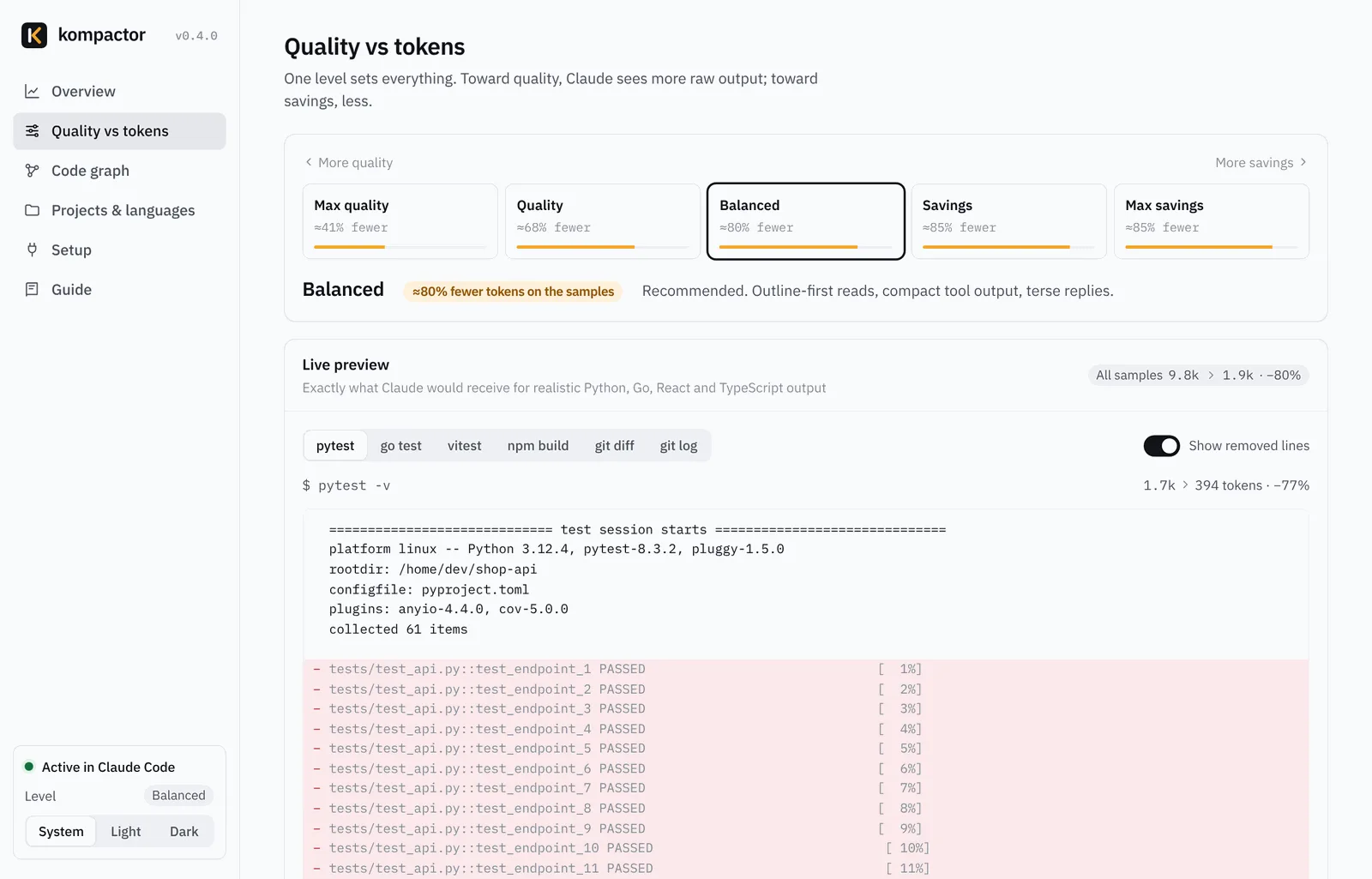
| Level | What Claude gets | Rules added |
|---|---|---|
| 1 Max quality | Almost everything. Only very large outputs are touched, and only pure noise is removed. | 0 tokens |
| 2 Quality | Noisy commands compacted, passing tests hidden, one-line git log, outlines for files over 800 lines. | 72 tokens |
| 3 Balanced (default) | Outlines from 400 lines, library frames trimmed, a 500-token code map, lean-code rules. | 156 tokens |
| 4 Savings | Tighter caps, 3 lines of diff context, outlines from 250 lines, shorter prose. | 176 tokens |
| 5 Max savings | 80-line caps, 1 line of diff context, outlines from 150 lines, telegraphic prose. | 177 tokens |
We ran the same 27 sessions at both ends of the range. Max quality is close to neutral, and Balanced and Max savings land within run-to-run noise of each other at the session level, because turns saved matter more than how hard each output is squeezed. Every level kept all 27 answers correct.
Change vs no Kompactor, by level (negative is better). 27/27 answers correct at every level.
Seeing what every turn saved
Kompactor shows its work in four places, so you never have to trust a single headline number:
- After each reply:
Kompactor: −8.2k tokens this turn (13.1k › 4.9k, −63%) · session −41k · context ≈31% smaller - In the Claude Code status line:
Kompactor −41.3k · ctx −31% · last turn −8.2k · Balanced - In the VS Code status bar, with details on hover.
- On the dashboard (
kompactor start): a per-turn chart, the commands whose output shrank most, and savings by feature and project.
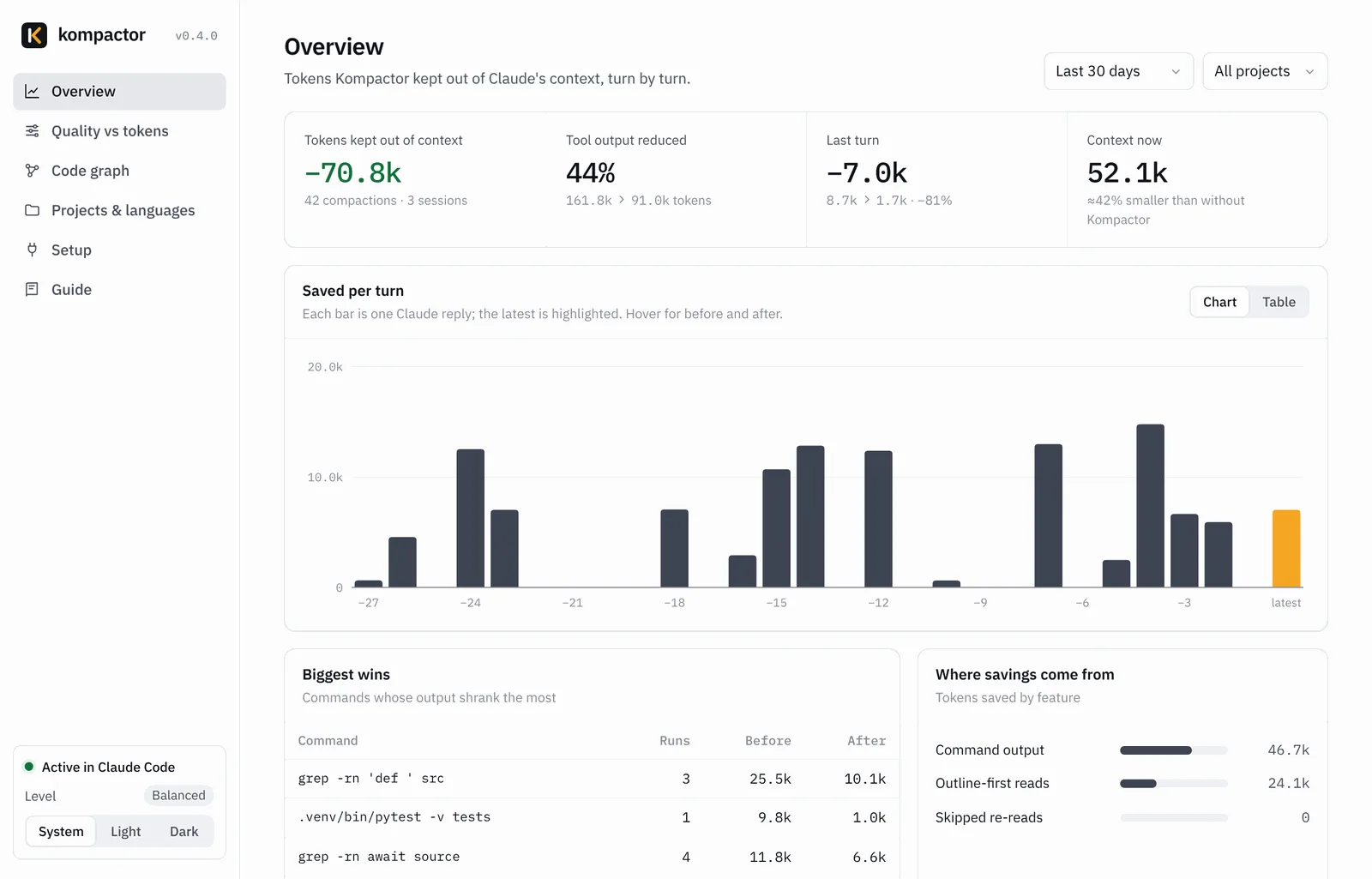
The numbers are deliberately conservative. Savings count only what Claude would really have read: when Claude Code would have truncated an output anyway, only the truncated size counts, and when Claude reads a whole file after its outline, the outline's saving is reversed. kompactor estimate goes further and replays your past Claude Code sessions through the current settings, so you can see what Kompactor would have saved on your own work before you rely on it.
The local code graph
The outlines and code map come from a local index of your repository: functions, classes, imports and calls for Python, Go, TypeScript, JavaScript and React. It builds in about a second (Flask: 85 files in 0.33 s), refreshes in the background after edits, and is never sent anywhere or written into your repo.
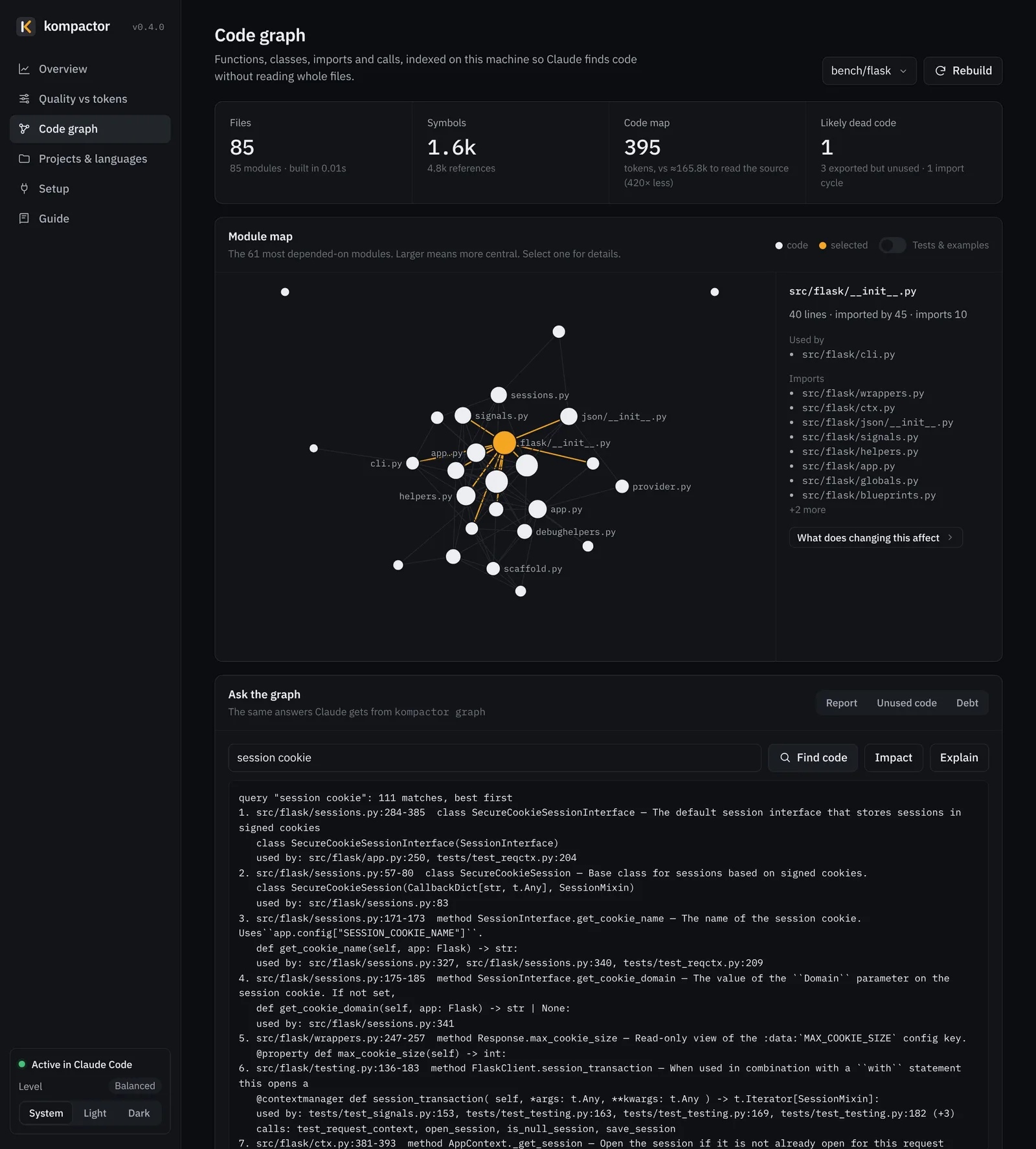
Claude uses it on its own when it needs to find code or check what a change affects, and you can query it directly:
kompactor graph query "session cookie"     # find code by topic, with line ranges and who uses it
kompactor graph impact createStore         # what uses it, and which tests to run
kompactor graph explain Name               # one symbol: signature, callers, callees, tests
kompactor graph report                     # core modules, entry points, import cycles
kompactor graph unused                     # dead-code candidates
Install Kompactor
Claude Code plugin (recommended). In any Claude Code session, run these one at a time, then restart Claude Code:
/plugin marketplace add amarkum/kompactor
/plugin install stackcone@kompactor
/kompactor setup
The last step adds the status line and the shell prefix that compacts failing commands. A plugin can't set those itself, so this one command does it, and it never replaces a status line or shell prefix you already have.
pip, pipx or uv (macOS, Linux and Windows; Python 3.9+, no dependencies):
pipx install kompactor
kompactor setup
VS Code: download the .vsix from GitHub Releases, install it with Extensions › ⋯ › Install from VSIX…, and click Enable. The Claude Code CLI and the VS Code extension read the same settings, so one install covers both.
Using it day to day
Nothing changes in how you work. Ask Claude Code what you normally would, for example "run the tests and tell me which one fails", "where is the session cookie signed?" or "what does changing createStore affect?". To check it's running, type kompactor in a terminal:
Kompactor 0.7.6: ON
  Connected via the Claude Code plugin. New Claude Code sessions are compacted.
  Level: Balanced (level 3 of 5). Change it: `kompactor config preset 1-5`, the dashboard, or /kompactor balanced
Saved so far: 41.3k tokens (−38%) over 52 tool calls. Details: `kompactor gain`| In Claude Code | What it does |
|---|---|
/kompactor | Is it on, your level, savings so far |
/kompactor balanced, /kompactor max savings, /kompactor max quality | Change the level |
/kompactor review | Suggests cuts in your current diff: duplicated helpers, unused options, dead branches |
/kompactor audit · /kompactor debt | Dead-code candidates · a list of FIXME/HACK/TODO shortcuts |
/kompactor stop · /kompactor start | Pause it · turn it back on |
To turn it off at any time: kompactor stop pauses it and keeps your settings, kompactor start resumes it, and kompactor uninstall removes it from Claude Code (add --purge to delete its local data too).
Rolling it out to a team
To offer Kompactor to everyone who works in a repository, commit this as .claude/settings.json. When a teammate trusts the folder, Claude Code installs the plugin, and each person runs /kompactor setup once:
{
  "extraKnownMarketplaces": {
    "kompactor": { "source": { "source": "github", "repo": "amarkum/kompactor" }, "autoUpdate": true }
  },
  "enabledPlugins": { "stackcone@kompactor": true }
}
To set the team's level for a repository, commit a .kompactor.json next to the code, for example to keep terraform plan output untouched:
{ "preset": 4, "overrides": { "never_compact": ["terraform plan"] } }What it runs, and what it never does
A tool that sits between your agent and your code has to be easy to trust, so here is the complete list:
- It runs locally. No server, no account, no telemetry, and no network requests of its own. The dashboard listens on
127.0.0.1only. - It reads the tool output Claude Code passes to its hooks, the files Claude reads (to outline them) and your project's source (for the code graph). Its hooks never read your session transcripts.
kompactor estimatereads your local Claude Code logs only when you run it. - It writes raw copies of shortened output, savings figures and the code index to
~/.kompactor, deleted after 30 days by default. Nothing is written to your repositories. - It never changes your permission rules or sandbox settings, never changes what a command does, and never sends your code or output anywhere.
The short rules it adds to Claude's context are plain text you can read in rules.py. Full details are in the README and the privacy policy.
Limits and honest caveats
- Session savings are smaller than command savings. Expect around 10 to 30% per session on output-heavy work, not 90%.
- Very short sessions can cost slightly more. The rules add a fixed ~156 tokens at Balanced. If your sessions are mostly two-turn questions with tiny output, use level 1 or 2.
- Language support for code features is focused. Command output from any language is compacted, but outlines, stack-frame trimming and the code graph understand Python, Go, TypeScript, JavaScript and React.
- It's a Claude Code tool. It runs in the Claude Code CLI and VS Code extension, not in the Claude chat apps, which don't run plugin hooks.
- Hooks add a little latency: about 50 to 100 ms per hook, because the filters run in Python.
FAQ
Does Kompactor change Claude's answers?
In the measured runs, no: 27 of 27 answers were correct with and without it. It removes noise and always keeps errors, failures and summary lines, and Claude can fetch any original with kompactor show.
Does it send my code anywhere?
No. Everything happens locally through Claude Code's hooks.
Why is the per-session saving smaller than the per-command saving?
Because most of what each turn re-sends is Claude Code's own fixed context. Kompactor shrinks the tool-output part, which can drop 80 to 99% per command.
Is it free?
Yes. It's MIT-licensed and open source on GitHub, and available on PyPI.
Something looks wrong. What do I do?
Run kompactor doctor, or kompactor stop to turn it off at once. To run a single command untouched, start it with KOMPACTOR_RAW=1. Bugs and ideas go to GitHub issues.